We’ve all experienced the dreaded salon regret: asking for a trendy taper fade or modern undercut, only to realize the cut clashes completely with our jawline or face shape. Hair takes weeks or months to grow back. Thankfully, Android smartphones allow you to simulate haircuts, beard thicknesses, and hair colors in under 60 seconds before making a permanent cut.
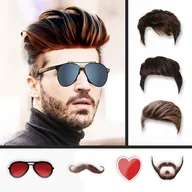
✂️ #1 Virtual Styler
Hair Style Photo Editor
Test 100+ men's and women's hairstyles, moustaches, full beards, sunglasses, and custom color overlays in realistic HD.
4.0 Rating
Live Face Align
100% Offline
Matching Haircuts to Your Face Shape
| Face Shape | Best Recommended Haircuts | Styles to Avoid |
|---|---|---|
| Oval | Taper Fade, Textured Quiff, Side Part | Heavy forward bangs that hide the forehead |
| Square | Buzzcut, High Skin Fade, Pompadour | Center-parted flat hairstyles |
| Round | Angular Fringe, High Fade with Volume on Top | Round bowl cuts and flat crew cuts |
| Diamond / Heart | Medium-length flow, Layered Curls, Textured Crop | Overly sharp skin fades that accentuate cheeks |
How to Use Hairstyle Photo Editor in 4 Easy Steps
- Snap a Neutral Selfie: Take a photo with hair combed back or pinned away from your forehead in natural lighting.
- Select from Men's & Women's Catalogs: Browse categories spanning Short Fades, Medium Textures, Long Waves, Spikes, and Curly Afro styles.
- Fine-Tune Multi-Touch Placement: Pinch-to-zoom, rotate, and adjust transparency to align the hairline seamlessly with your forehead.
- Pair with Facial Hair: Add stubble, anchor beards, or clean goatees to visualize your complete transformation.
Frequently Asked Questions
Can I change the hair color in the app?
Yes. Hairstyle Photo Editor includes realistic color-blending sliders supporting natural brunette, blonde, platinum silver, jet black, and vibrant fashion hues.
Is my photo uploaded to any external server?
No. All photo rendering and editing occurs 100% on your local device hardware, ensuring complete biometric photo privacy.