In an image-saturated social media ecosystem, visual presentation dictates engagement. Whether you are promoting a weekend garage sale, announcing a seasonal discount at your boutique, publishing a podcast episode, or hosting a community charity drive, a bland text post gets scrolled past instantly.
High-impact graphic design used to require specialized desktop software and hours of tutorial learning. Today, mobile creators need tools that let them draft, style, and publish promotional banners in under three minutes between meetings.
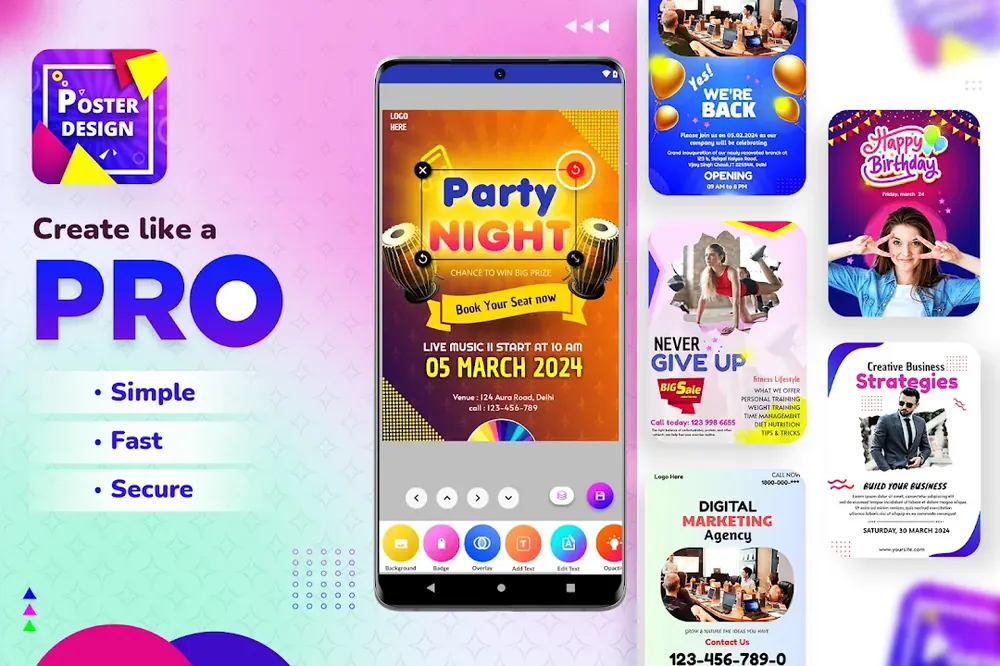 Design promotional flyers, event invitations, and sales banners with pre-formatted aspect ratios.
Poster Maker by Bhima Apps turns your smartphone into an on-demand creative studio. With hundreds of customizable layouts, vibrant gradient backgrounds, and intuitive layer management, anyone can produce professional promotional assets without design experience.
Frequently Asked Questions (FAQ)
What aspect ratios does Poster Maker support?
Poster Maker supports all major digital formats: 1:1 (Instagram Post), 9:16 (TikTok/Reels/Stories), 16:9 (YouTube Banner/Thumbnails), and standard A4/Letter print flyer sizes.
Can I use Poster Maker offline without Wi-Fi?
Yes! The core editing engine, vector shapes, fonts, and background textures work offline, enabling you to design graphics anytime on the go.
Can I add my own background photos and custom fonts?
Yes, you can import images from your phone gallery, adjust opacity and color filters, and pair them with dozens of stylized typographic fonts.
Explore Verified Google Play Studios
Discover more high-performance games, retro arcade titles, and creative utility apps developed by Shutter Games and Bhima Apps.